
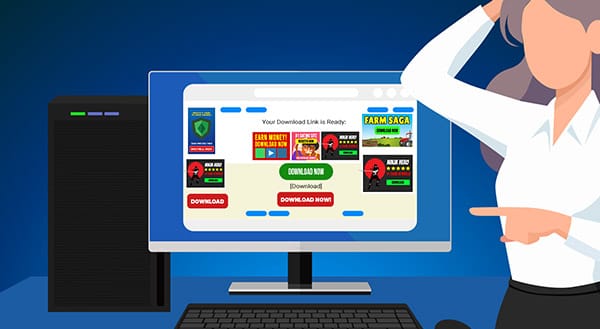
Downloading software from the internet might seem simple, but it can sometimes feel like navigating a minefield. Many websites, even seemingly legitimate ones, feature fake download buttons designed to trick you into downloading malware or other unwanted programs. Let's explore how to recognize these deceptive buttons and keep your computer safe.
Why Do Fake Buttons Appear on Legitimate Websites?
You're probably wondering, "Why would a trustworthy website have fake download buttons?" The answer lies in online advertising. Many publishers rely on ads to make money. Unfortunately, they often have little to no control over the content of these ads. Advertisers may sneak in fake banners disguised as download buttons to mislead visitors. This practice can make even a reputable website feel unsafe.
Why Are Fake Download Buttons Dangerous?
Clicking a fake download button can lead to serious consequences. Instead of getting the application you need, you might end up downloading malware, which can:
- Steal your personal information.
- Slow down your computer.
- Open the door for even more harmful software.
It's not just about annoyance; it's about protecting your privacy and security.
How to Spot Fake Download Buttons
Thankfully, there are a few telltale signs that can help you distinguish real download links from fake ones.
Look for an "Advertisement" Header
Many fake buttons are part of advertisements. Check for an "Advertisement" header near the button or a small "X" to close the ad. This is a strong indicator that what you're seeing isn't a genuine download link.
Hover Over the Button
Before clicking, hover your mouse over the button. In most browsers, you'll see the destination URL in the status bar at the bottom of the window. If the link doesn't match the site you're trying to download from, don't click it.
Avoid Giant Buttons
Legitimate websites rarely use oversized, flashy buttons to prompt downloads. Instead, they often provide a plain-text link that might say something like "Download now" or "Download [Program Name]." If it looks too good to be true, it probably is.
Use an Ad Blocker
Many fake download buttons are embedded in ads, which can be blocked with a browser-based ad blocker. These tools can significantly reduce website clutter and make finding the actual download link easier. If you're not sure how to install an ad blocker, we'd be happy to help.
What to Do If You've Downloaded Malware
If you think you've accidentally clicked a fake download button and your computer is acting strange, don't panic. Give us a call at 131 546. We can help you remove any unwanted programs and get your computer back to running smoothly. And if you need assistance setting up an ad blocker, we're here for that too.
Jim's IT Services in Australia
-
This is about the third time I have asked Peter for help - first with my desktop, and now with my laptop. Apart from being a really kind person, his service is friendly quick, to the point, and really affordable. Couldn't ask for better! Gitte

Gitte Lindgaard
04/01/2024Great communication and quality of work. Loved Brad’s recommendations and communication throughout my experience with him.
Imran Aysel
02/11/2023Had a problem with my PC a was stressing out so hard, lucky that i went onto Jims I.T an got a phone call about 40 mins later, really quick response also Sean the guy that helped me was an absolute legend such a nice friendly guy an was at a fair price an sorted everything i needed thank u again 🙂
Corey Cullen
02/12/2023 -
Big Thank you to the guys at Jim's I.T! I had booked in my Work Station Laptop for a repair due to my computer not reading my SSD, I was extremely worried as my data on there was priceless! Brad & Tony both called me back within 30 Minutes of putting a request through online, making me feel valued, they treated me as a Priority. They had my Computer back to a1 functionality within 2 days! I was expecting to lose most of my data as I had taken the laptop to a store in western suburbs Melbourne and they had told me the drive was corrupted and could not be recovered , I was then quoted $300 for a simple SSD replacement witch I could not justify! I contacted the guys at Jim's IT the following day and I am blown away by the service, They explained each step of the process making me feel like I was in the loop at all times! I have now recommended them to the rest of my company and we will be using them as our 1 stop shop for all computer and I.T related enquiries! 10 out of 10 service, Can not recommend them enough 🙂
Jem Karan
30/04/2024Julian Rallings Was very helpful highly recommended him
Michelle Warner
02/09/2023I had Brad do I remote job for me as I was worried about security on my computer Brad connected to my computer scanned my computer and found their all many issues you helped me install an antivirus program and remove all the issues that are on my computer I current recommend Brad hiley enough
Adam Wolarczuk
02/11/2023 -
Dealing with Brad was easy and smooth sailing. Told him what I need and he made it happen.
Fatih
29/04/2024Great help and fast service. Friendly staff. They were really quick to fix my IT problems the same day. Extremely impressive.
Duygu Bayboru
29/03/2023Laith was super helpful and responsive, im super happy with their advice and support.
Anika Squire
02/05/2022
For a free quote please follow the below steps

Outpace Competitors with AI Assistance in Microsoft Teams
By Tony Altun |
Is a Broken MacBook Worth Repairing?
By Tony Altun |

How to Factory Reset a Laptop (To Fix It, or To Wipe It Properly Before You Sell)
By Adrian |

How to Improve Your WIFI with these 10 Easy Steps
By Paul Zdzitowiecki |

Reducing Support Costs: Strategies for Automating Technical Explainers and Product Walkthroughs
By Jim's IT |

IT Support Services That Every Home Office Needs In 2025
By Tony Altun |

Tony Altun is the General Manager of Jim's IT, where he leads a nationwide network of IT professionals delivering reliable tech support, computer repairs, and business IT solutions across Australia. With a strong background in IT services, sales, and customer-focused solutions, Tony has built a reputation for driving growth while maintaining a clear focus on service quality and customer satisfaction.