
How To Know If A Text Is A Scam In Australia
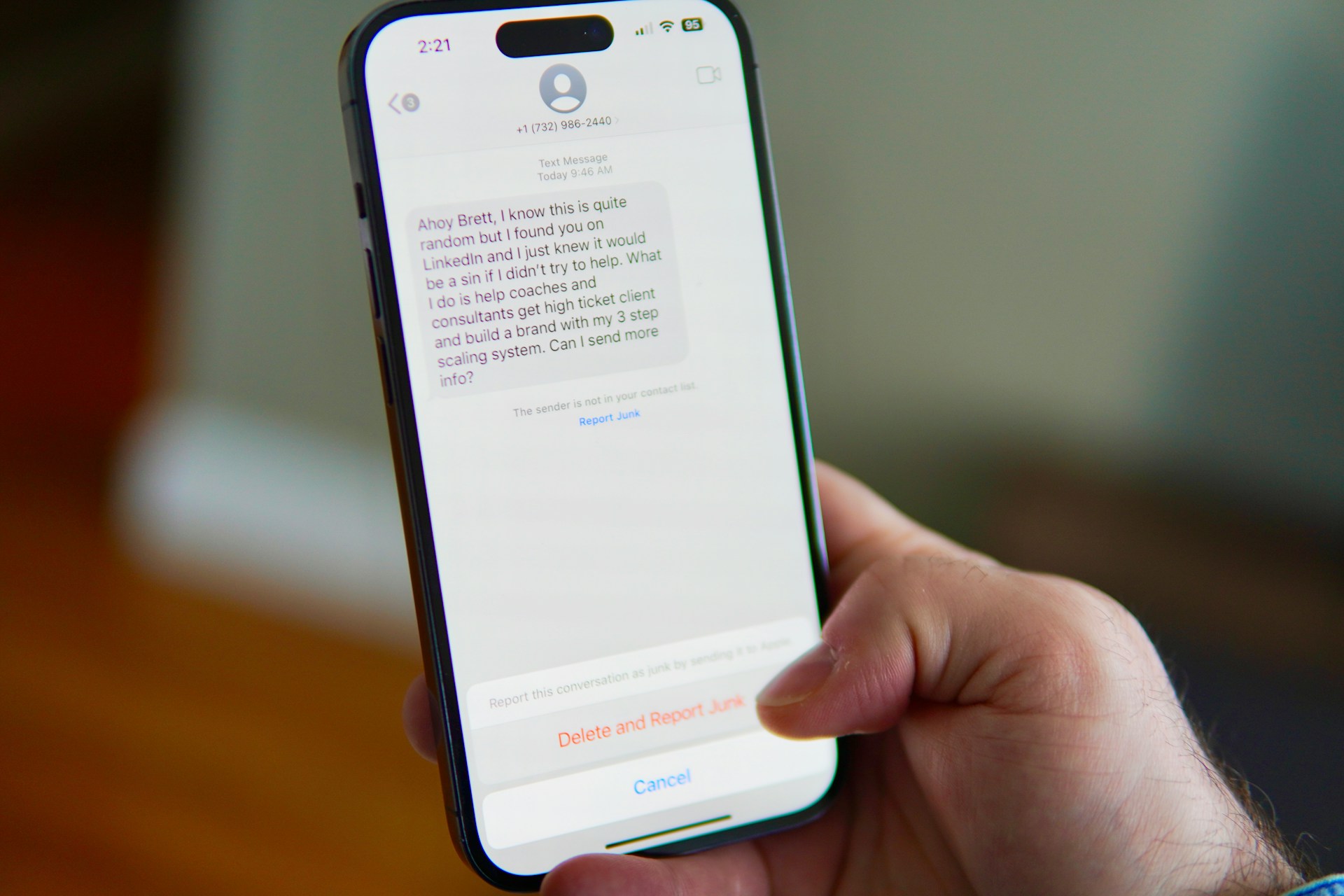
A text is probably a scam if it pushes you to act immediately, asks for money or personal details, or comes from a number you don’t recognise pretending to be someone you trust.
Text scams in Australia are effective. In 2025, Australians received almost 30,000 scam texts, according to Scamwatch. Those texts cost people $17,977,490. Most fell into three categories: phishing attempts, fake job offers, and investment scams.
This guide breaks down how these scams operate. We'll explain what changed with SMS in Australia after 1 July, the red flags to watch out for, and what to do if you get scammed.
Key takeaways
Text scams in Australia rely on urgency and pressure. They ask you to click a link, enter personal details, or transfer money before you’ve had time to question it. Since 1 July 2026, unregistered business texts are labelled “Unverified” on your phone. Even so, scams will still get through occasionally, so it's worth taking a few minutes to learn the warning signs.
How do text scams work?
Just like phone scams and phishing emails, text scams work because scammers borrow someone’s identity to get past your guard. That someone could be the ATO, your bank, Australia Post, or even your mum or your best mate. Scammers hope that if the text looks like it’s from a person or business you already trust, you’re far less likely to question it.
When they’ve got your attention, they pile on the pressure. A good scam text doesn’t give you time to think. It says your account’s been suspended or your parcel’s stuck at the post office. Maybe someone’s trying to log into your bank right now.
Then comes the link. Tap it, and you end up on a website that’s often a near-perfect copy of the real one: same logo, same colours, same layout. You type in your username and password, or maybe your card number, thinking you’re logging into your actual bank or paying an actual bill. You’re not. Everything you type goes straight to the scammer.
From there, it can go two ways.
- Sometimes they use your login straight away to drain your bank account.
- Other times they hold onto your details and use them weeks or months later, maybe to open a credit card in your name or apply for a loan you never asked for.
The new SMS Sender ID Register rules
You might’ve noticed some texts look a bit different lately. From 1 July, Australia rolled out a system that gives every legitimate business a registered name for their texts instead of a random number.
Here’s how it works:
- Registered sender ID: The text shows up the way you’re used to, with the business’s name at the top, like “AusPost,” “Linkt,” or “myGov.”
- Unregistered sender ID: The text is labelled “Unverified,” and it gets lumped into one thread with everything else that hasn’t been registered.
Think of that label as a heads-up telling you the sender hasn’t been checked and confirmed. An ACMA spokesperson explained the point of the change is to give people more confidence that a branded text is genuinely from who it says it’s from. The “Unverified” tag should make you stop and think twice before clicking anything or handing over any details.
More than 17,000 businesses have already registered their sender ID. If a business hasn’t sorted theirs out yet, their texts risk appearing in that “Unverified” pile, too, even if they’re a real business.
Finally, “Unverified” doesn’t automatically mean a scam, and a text that looks verified doesn’t automatically mean safe, either. Scammers adapt fast, and there’s nothing stopping someone from registering a sender ID and still sending dodgy texts down the track.
6 red flags it’s a text scam
Stop and think before you tap anything. If a text does any of the below, be cautious:
- It wants you to do something immediately, with zero time to think it over.
- It asks you to pay or transfer money to an account you’ve never used before.
- It includes a link to click or a number to call, right there in the text.
- It asks you to log into an account or share your password, Medicare number, credit card information, or other personal details.
- It claims your account’s been hacked or tied to fraud.
- It threatens to cancel a service, cut off delivery, or charge a fine unless you respond immediately.
How to protect yourself against SMS scams
Protect yourself against text scams by following these steps:
- Treat “Unverified” messages with extra caution.
- Don’t click links. Search for the website yourself, or use the organisation’s app.
- Don’t call numbers given in the text. Look up the real number independently and call that.
- Be wary of job offers with no interview. Check the person out first.
- If a contact texts from a “new number,” ring their old number to confirm.
What to do if you think you’ve been scammed
Scammers are good at their job, and plenty of switched-on people have fallen for their tricks. So, don't beat yourself up. Instead, take action.
| Step | What to do |
|---|---|
| Act fast | Call your bank or card provider straight away and tell them what happened. |
| Lock things down | Change your passwords on your banking, email, government, and shopping accounts. |
| Get support | Call IDCARE on 1800 595 160. They’re Australia’s free identity and cyber support service. |
| Report it | Head to Scamwatch and report what happened. |
FAQs
What are common text message scams?
The big ones are fake delivery texts (a “problem” with your parcel), phishing texts pretending to be your bank or myGov, fake job offers with big pay for barely any work, and investment scams promising quick returns. All of them want the same thing: your money or your personal details.
What are the signs a text is a scam?
A text could be a scam if it pushes you to act immediately, asks for money or personal details, includes a link or number to contact, and creates a sense of panic.
What does “Unverified” mean at the top of a text message in Australia?
"Unverified" texts in Australia mean the sender hasn’t registered their business name with the SMS Sender ID Register. It doesn’t automatically mean it’s a scam, but it does mean the phone hasn’t been able to confirm who sent it. Treat it with extra caution.
Worried About Scams? Let Jim’s IT Check Your Digital Security
Scam texts are becoming harder to spot. If you’re concerned about your computer, email or online security, a local Jim’s IT expert can help. We can check your devices, improve your security settings and help make sure your important accounts are better protected. Book a Jim’s IT security check today or call 131 546.

Paul Zdzitowiecki is an IT specialist and contributor at Jim’s IT, with extensive experience in computer repairs, managed IT services, and business technology solutions across Australia. Paul regularly writes about computer repairs, Wifi and internet optimisation, cybersecurity, and business IT support, delivering practical, easy-to-understand advice that helps readers solve real-world tech problems.