
Jim's IT Melville
Our team of professional experts is committed to providing comprehensive assistance for customers throughout Melville, Australia. Whether you need IT services, we deliver tailored strategies to meet your needs. With our local knowledge, we ensure outstanding solutions that align with the varied preferences of businesses in this area. We focus on various areas to deliver full-scale solutions to achieve success in your endeavors.

Positioned in the center of Melville, Australia, this region provides a unique mix of natural beauty , combined with a diverse population. Famous for its historical landmarks, Melville is a place where everyone feels at home.
Home to inviting cafes and restaurants and a range of outdoor activities, Melville beckons travelers to experience its diverse offerings. Whether you are interested in its natural wonders, you will find endless opportunities for enjoyment within Melville.
The area is characterized by its welcoming locals, who are keen to offer a helping hand. Due to its proximity to major cities, Melville is an excellent place for both short visits and long stays.
Within Melville, there is a seamless fusion of tradition and modernity, making it a place that is thriving and dynamic. For outdoor lovers, Melville has numerous beaches, rivers, and scenic spots to experience and appreciate.
Needed my laptop fixed fast as I use it for work. The Jim’s IT team were able to get me back up and running in no time at a good price. Highly recommend this very capable team

 Mehmet Altuntas
01/05/2024Julian Rallings Was very helpful highly recommended him
Michelle Warner
02/09/2023Great help and fast service. Friendly staff. They were really quick to fix my IT problems the same day. Extremely impressive.
Duygu Bayboru
29/03/2023Dealing with Brad was easy and smooth sailing. Told him what I need and he made it happen.
Fatih
29/04/2024Brad was fantastic! Quick to respond, and to resolve my issue. I would highly recommend him to anyone! Thanks again!
Riccardo D'Alberto
02/09/2023Our journey with Jim's IT for our business fit out was nothing short of exceptional. From the very start, their team demonstrated a profound understanding of our needs, crafting a tailored solution that perfectly aligned with our brand identity and operational requirements. Their attention to detail, coupled with open communication throughout the project, ensured a stress-free experience. What truly set Jim's IT apart was their commitment to excellence in craftsmanship. Every aspect of our office redesign, from the sleek workstations to the integration of state-of-the-art technology, was executed with precision and care. The result? A workspace that not only looks impressive but also fosters productivity and collaboration among our team. Without hesitation, I would highly recommend Jim's IT to any business seeking a partner who delivers on both expertise and creativity.
Eray Kurul
01/05/2024Hired Brad to diagnose an issue with a nephews laptop, and the service was great. His team were able to collect the pc, diagnose and repair the issues and return it in less than a handful of days, and at a reasonable price. Communication throughout was great, very satisfied.
Tyson S
02/03/2024Excellent and friendly service. I found Laith patient, knowledgeable, helpful and professional. Very good, efficient service from start to finish.
Grace
02/05/2022Had a problem with my PC a was stressing out so hard, lucky that i went onto Jims I.T an got a phone call about 40 mins later, really quick response also Sean the guy that helped me was an absolute legend such a nice friendly guy an was at a fair price an sorted everything i needed thank u again 🙂
Corey Cullen
02/12/2023








Jim’s IT services the below areas in the Melville region
FAQ
Avoid accessing sensitive information when connected to public Wi-Fi and use a VPN if necessary.
Install monitoring tools that provide insights into CPU, memory, and disk usage.
Turn off the device immediately, remove any external components, and dry it thoroughly.
Blogs

How to Factory Reset a Laptop (To Fix It, or To Wipe It Properly Before You Sell)
How to Factory Reset a Laptop (To Fix It, or To Wipe It Properly Before You Sell) A factory reset takes your laptop back to how it was the day you switched it on, wiping your apps, settings, and files and leaving you with a clean copy of the operating system. People do it for […]
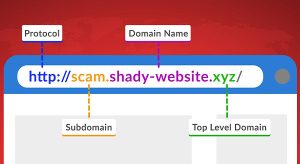
Hackers Hide in the Hyperlinks: Spotting Malicious URLs
Whether browsing the Web, using social media, or checking your email, it’s important to exercise caution when encountering links. Cybercriminals actively craft deceptive links to steal personal information or infect devices with malware. Here’s what to look out for: Hover Before You Click To identify a malicious link, you must first see where it goes. […]

How To Upgrade to Windows 11 Before It’s Too Late
How to Upgrade to Windows 11 Before it’s Too Late If you’re wondering if you should upgrade your computer to windows 11, and what difference windows 11 will make, you are not alone. Many users are still waiting to see if its worth upgrading to windows 11. Now the clock is ticking and Windows 10 […]
and Operated
All over the World
Divisions to choose from