
Whether browsing the Web, using social media, or checking your email, it's important to exercise caution when encountering links. Cybercriminals actively craft deceptive links to steal personal information or infect devices with malware.
Here’s what to look out for:
Hover Before You Click
To identify a malicious link, you must first see where it goes. Hover your mouse cursor over the link's text, but don't click on it. This allows you to preview the full destination address before deciding whether to proceed. Be very wary of links trying to send you to an unknown site other than what's expected based on the context.
Look for HTTPS at the Start
Legitimate websites will use "https://" to indicate that the page connection is secured using SSL encryption. However, just seeing the "s" does not guarantee safety, so further inspection is needed.
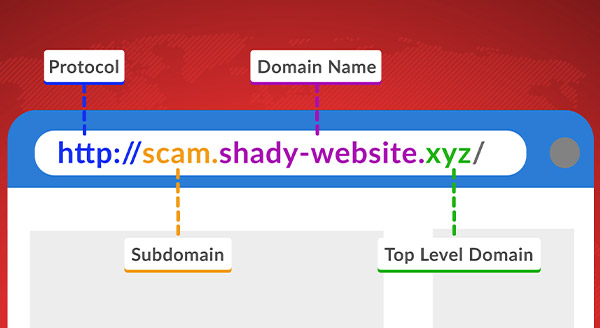
Observe the Subdomain
It's important to pay attention not just to the overall domain name but also to any subdomains listed before the main domain. This is often just “www,” but it can be anything. You might have seen something like “mail.google.com,” and that’s perfectly legitimate.
However, an attacker could use the subdomain to look like the actual domain. For example, “google-mail-login.fake-domain.com.”
The domain you will go to when clicked is “fake-domain.com,” not Google.
Watch out for Special Characters
Look out for hyphens in the domain name. A hyphen alone doesn't mean a website is malicious – many websites have hyphens in their domain names – however, it is a common trick to emulate a well-known domain name.
For example, a link to “www.g-oogle.com” would be suspicious, as Google's actual domain is simply “www.google.com.” The extra hyphen is a red flag that the site could be impersonating Google.
Look at the Extension
Another essential aspect to scrutinize regarding domains is the top-level extension at the end. Common extensions for legitimate websites include “.com,” “.org,” “.edu,” “.gov,” and country-specific endings such as “.ca” for Canada or “.uk” for the United Kingdom. However, cybercriminals may use alternative extensions, hoping to disguise malicious sites. Be wary of unfamiliar extensions or ones that don't align with the expected use case. For example, a banking site using “.net” instead of “.com” could indicate a phishing attempt.
Staying vigilant and taking the time to inspect links quickly can help shield you from the majority of online threats. If any part of a link raises concerns about where it may lead, it's usually best not to risk clicking until you’ve had a chance to verify the context through other trusted means.
Maintaining cautious Web habits is the easiest way to help avoid becoming the victim of deceptive scams or malware attacks online.
If you think you have clicked on a malicious link, contact us at 131546 today and see how we can help.
Jim's IT Services in Australia
-
Had major internet issues with our site from a different supplier. Tony was out there within 24 hours with a new modem and an internet connection that actually worked plus reconfigured all our PC’s. Couldn’t be happier.

ENGIN2
29/03/2023Excellent and friendly service. I found Laith patient, knowledgeable, helpful and professional. Very good, efficient service from start to finish.
Grace
02/05/2022Thanks for help You done a good job
Ahmed abaza
02/11/2023 -
Julian Rallings Was very helpful highly recommended him
Michelle Warner
02/09/2023Brad was so quick in response and fixed my Laptop in the same day. I highly recommend Brad for any computer related issues.
Robert Allwin
02/12/2023He was amazing - really polite and nice to deal with. And delivered a fixed computer so fast at Christmas time! Stoked!
Tessa Hawthorn
02/05/2022 -
Laith was super helpful and responsive, im super happy with their advice and support.
Anika Squire
02/05/2022Hired Brad to diagnose an issue with a nephews laptop, and the service was great. His team were able to collect the pc, diagnose and repair the issues and return it in less than a handful of days, and at a reasonable price. Communication throughout was great, very satisfied.
Tyson S
02/03/2024Our journey with Jim's IT for our business fit out was nothing short of exceptional. From the very start, their team demonstrated a profound understanding of our needs, crafting a tailored solution that perfectly aligned with our brand identity and operational requirements. Their attention to detail, coupled with open communication throughout the project, ensured a stress-free experience. What truly set Jim's IT apart was their commitment to excellence in craftsmanship. Every aspect of our office redesign, from the sleek workstations to the integration of state-of-the-art technology, was executed with precision and care. The result? A workspace that not only looks impressive but also fosters productivity and collaboration among our team. Without hesitation, I would highly recommend Jim's IT to any business seeking a partner who delivers on both expertise and creativity.
Eray Kurul
01/05/2024
For a free quote please follow the below steps

Disaster Recovery vs. Business Continuity: What’s the Difference and Why You Need Both
By Tony Altun |

Reducing Support Costs: Strategies for Automating Technical Explainers and Product Walkthroughs
By Jim's IT |

How To Upgrade to Windows 11 Before It’s Too Late
By Paul Zdzitowiecki |

Ransomware a Risk for You, Too
By Tony Altun |

Why Is My NBN So Slow? Real Causes and Fixes That Actually Work
By Adrian |
Got A Bad Case Of Password Exhaustion?
By Tony Altun |

Tony Altun is the General Manager of Jim's IT, where he leads a nationwide network of IT professionals delivering reliable tech support, computer repairs, and business IT solutions across Australia. With a strong background in IT services, sales, and customer-focused solutions, Tony has built a reputation for driving growth while maintaining a clear focus on service quality and customer satisfaction.