
Computer Repairs Shalvey
Welcome to Jim’s IT Shalvey, your local IT specialist servicing Shalvey and the surrounding areas.

My name is Tony, and I'm here to help you with all of your IT needs including computer repairs Shalvey. You can reach me directly at 131 546.
"Protect your data with our comprehensive repair and recovery services."
Computer Repairs Shalvey
Having to deal with computer issues can be frustrating, but fear not — our team in Shalvey is here to simplify it all for you. Offering a myriad of IT services, including computer repairs in Sydney and Shalvey, we aim to make your tech experience not just seamless but downright hassle-free.
Our adept computer technicians are well-versed in the intricacies of both laptops and desktops. Whether it's Apple, Microsoft, Lenovo or HP, we've got the expertise to tackle it all.
Expert advice and professional repair services for all computer models.
Worried about malware and viruses? Fear not — we're here to purge your computer of any digital bugs.
Reliable computer repairs Shalvey:
- Laptop and desktop repairs
- Clean computer viruses and malware
- Safeguarding and recovering your valuable data
- Crafting and configuring robust networks
- Helping you set up cloud services and storage solutions
- Printers and Scanners setup
- Providing expert email setup and support
- Provide mobile device configuration and support
- Website Design and SEO for Businesses
- …and much more!
Whether you're nestled at home, seeking remote assistance or a business in need of IT services, Jim's IT in Shalvey is your go-to for tech solutions. Our team of enthusiastic computer technicians is always ready to conquer any tech challenge you throw our way.
From the intricacies of data backup and recovery to the finesse of network setup and configuration, cloud services, storage solutions, email setup and mobile device support — we've got all your IT needs covered. Our relentless focus on delivering quality solutions is complemented by the deployment of our cutting-edge tools, techniques and technology for the most efficient services.
What sets us apart is our commitment to exceptional customer service. Our team in Shalvey is ready to go the extra mile, ensuring your tech journey is smooth and gratifying.
If computer issues are knocking on your door or you need PC repairs in Shalvey, reach out to us. Request a quote and experience the Jim's IT difference. We offer flexible appointment times tailored to your schedule, always providing a no-obligation, free quote before you book us for any work. Connect with us today — let Jim's IT be your trusted IT partner, delivering top-tier computer repairs and IT services with a friendly smile.
Effortless computer repair services with guaranteed results.
But hey, don't just take our word for it. Dive into the reviews from our satisfied customers on Google!

-
Brad and his team are fantastic. Especially Brad, such great service and his knowledge in IT related solutions is top notch. I highly recommend Brad and his team for all IT support and work. Many thanks.

Frank Theoman
02/11/2023He was amazing - really polite and nice to deal with. And delivered a fixed computer so fast at Christmas time! Stoked!
Tessa Hawthorn
02/05/2022Great communication and quality of work. Loved Brad’s recommendations and communication throughout my experience with him.
Imran Aysel
02/11/2023 -
Leith was professional, and very accommodating. He got me the best price for what I needed as well as great advice. He will be my IT go to guy from here on in.
Hepa Taahi (Hepacan)
02/05/2022Absolutely fantastic service. Laith goes above and beyond to provide exceptional service and does an excellent job. I highly recommend him.
Irene Broussos
02/05/2022Laith was super helpful and responsive, im super happy with their advice and support.
Anika Squire
02/05/2022 -
Thanks for help You done a good job
Ahmed abaza
02/11/2023Saved Me!
riyan adesai
02/05/2022Had major internet issues with our site from a different supplier. Tony was out there within 24 hours with a new modem and an internet connection that actually worked plus reconfigured all our PC’s. Couldn’t be happier.
ENGIN2
29/03/2023
For a free quote please follow the below steps
Thank you for considering Jim’s IT Shalvey for your computer repairs and IT services needs.
Jim's Group - Need It Done? Jim's The One
Answer: This depends on the cost of repairs and the age of your computer. If repair costs exceed the value of the computer or if it's significantly outdated, it may be more economical to replace it.
Answer: This depends on the cost of repairs and the age of your computer. If repair costs exceed the value of the computer or if it's significantly outdated, it may be more economical to replace it.
Answer: HDDs are traditional spinning disk drives, cheaper and offer more storage. SSDs are faster, more durable, and use less power but are more expensive.

Can you get files back from a broken hard drive?
Can you get files back from a broken hard drive? In most cases, you can get files back from a broken hard drive. Your files are still on the disk, but the computer just can’t read them. To give yourself the best chance of a full recovery, stop using the drive straight away. Every restart […]
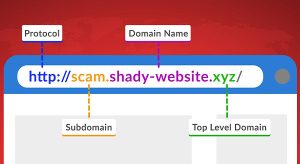
Hackers Hide in the Hyperlinks: Spotting Malicious URLs
Whether browsing the Web, using social media, or checking your email, it’s important to exercise caution when encountering links. Cybercriminals actively craft deceptive links to steal personal information or infect devices with malware. Here’s what to look out for: Hover Before You Click To identify a malicious link, you must first see where it goes. […]

Is the Blue Screen in Windows a Death Sentence for Your Computer?
Is the Blue Screen in Windows a Death Sentence for Your Computer? You’re in the middle of something important, and suddenly your screen goes blue. No warning. No chance to save. Just a wall of blue text staring back at you. At that point, the first thought is usually panic. Have I lost my work? […]
And Operated
All over the World
Divisions to choose from