
Computer Repairs Rosewater
Welcome to Jim’s IT Rosewater, your local IT specialist servicing Rosewater and the surrounding areas.

My name is Tony, and I'm here to help you with all of your IT needs including computer repairs Rosewater. You can reach me directly at 131 546.
"Protect your data with our comprehensive repair and recovery services."
Computer Repairs Rosewater
Having to deal with computer issues can be frustrating, but fear not — our team in Rosewater is here to simplify it all for you. Offering a myriad of IT services, including computer repairs in Adelaide and Rosewater, we aim to make your tech experience not just seamless but downright hassle-free.
Our adept computer technicians are well-versed in the intricacies of both laptops and desktops. Whether it's Apple, Microsoft, Lenovo or HP, we've got the expertise to tackle it all.
Reliable repairs provided by experienced technicians.
Worried about malware and viruses? Fear not — we're here to purge your computer of any digital bugs.
Reliable computer repairs Rosewater:
- Laptop and desktop repairs
- Clean computer viruses and malware
- Safeguarding and recovering your valuable data
- Crafting and configuring robust networks
- Helping you set up cloud services and storage solutions
- Printers and Scanners setup
- Providing expert email setup and support
- Provide mobile device configuration and support
- Website Design and SEO for Businesses
- …and much more!
Whether you're nestled at home, seeking remote assistance or a business in need of IT services, Jim's IT in Rosewater is your go-to for tech solutions. Our team of enthusiastic computer technicians is always ready to conquer any tech challenge you throw our way.
From the intricacies of data backup and recovery to the finesse of network setup and configuration, cloud services, storage solutions, email setup and mobile device support — we've got all your IT needs covered. Our relentless focus on delivering quality solutions is complemented by the deployment of our cutting-edge tools, techniques and technology for the most efficient services.
What sets us apart is our commitment to exceptional customer service. Our team in Rosewater is ready to go the extra mile, ensuring your tech journey is smooth and gratifying.
If computer issues are knocking on your door or you need PC repairs in Rosewater, reach out to us. Request a quote and experience the Jim's IT difference. We offer flexible appointment times tailored to your schedule, always providing a no-obligation, free quote before you book us for any work. Connect with us today — let Jim's IT be your trusted IT partner, delivering top-tier computer repairs and IT services with a friendly smile.
Committed to excellence in every computer repair we perform.
But hey, don't just take our word for it. Dive into the reviews from our satisfied customers on Google!

-
Needed my laptop fixed fast as I use it for work. The Jim’s IT team were able to get me back up and running in no time at a good price. Highly recommend this very capable team

Mehmet Altuntas
01/05/2024Brad had my broken screen on my laptop sorted in such a short amount of time. Quotation of job was provided promptly and communication throughout the process was second to none. Thanks Brad !
Eray Kurul
02/11/2023I came to Jim's IT recently looking for a custom PC build, and laptop repair for my wife. The service was impeccable, they went out of their way to assist with my queries and concerns - the only IT company I've engaged with who actually took the time to explain how custom PC builds work, and I've left with a lot of valuable knowledge! For the laptop repair, I was previously quoted $500 to fix the overheating issue; At Jim's, I received this fix for FREE as it was simply just a dusty fan, and not actual issues with the internal components!
Andrew Lawson
02/05/2024 -
Brad was fantastic! Quick to respond, and to resolve my issue. I would highly recommend him to anyone! Thanks again!
Riccardo D'Alberto
02/09/2023Hired Brad to diagnose an issue with a nephews laptop, and the service was great. His team were able to collect the pc, diagnose and repair the issues and return it in less than a handful of days, and at a reasonable price. Communication throughout was great, very satisfied.
Tyson S
02/03/2024Leith was professional, and very accommodating. He got me the best price for what I needed as well as great advice. He will be my IT go to guy from here on in.
Hepa Taahi (Hepacan)
02/05/2022 -
I had a problem that my old computer consultant could not fix. Tony from Jim's IT had my computer going in 10 minutes. Great expertise and service!!
Gottfried Lichti
29/09/2023He was amazing - really polite and nice to deal with. And delivered a fixed computer so fast at Christmas time! Stoked!
Tessa Hawthorn
02/05/2022Great help and fast service. Friendly staff. They were really quick to fix my IT problems the same day. Extremely impressive.
Duygu Bayboru
29/03/2023
For a free quote please follow the below steps
Thank you for considering Jim’s IT Rosewater for your computer repairs and IT services needs.
Jim's Group - Need It Done? Jim's The One
Answer: Avoid using the drive to prevent further damage and consult a professional data recovery service as soon as possible.
Answer: To extend battery life, avoid leaving your laptop plugged in all the time, don't let the battery fully drain often, and keep the laptop cool.
Answer: HDDs are traditional spinning disk drives, cheaper and offer more storage. SSDs are faster, more durable, and use less power but are more expensive.

7 AI Courses Focused on Real-World Applications in 2026
7 AI Courses Focused on Real-World Applications in 2026 AI is quickly leaving its experimental phase and entering mainstream business activities, leading many professionals to explore AI training sites and structured AI courses that focus on real-world implementation. The majority of organizations apply AI to one of their business practices. AI training, however, has not […]
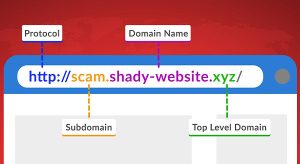
Hackers Hide in the Hyperlinks: Spotting Malicious URLs
Whether browsing the Web, using social media, or checking your email, it’s important to exercise caution when encountering links. Cybercriminals actively craft deceptive links to steal personal information or infect devices with malware. Here’s what to look out for: Hover Before You Click To identify a malicious link, you must first see where it goes. […]

What To Do After a Cyber Breach
When most people think about cybersecurity, they focus on prevention. But what happens if your business experiences a cyber breach despite your best efforts? Knowing the proper steps to take immediately afterwards can help minimize the damage and get your operations back on track. Here is a practical guide to navigating the aftermath of a […]
And Operated
All over the World
Divisions to choose from