
Computer Repairs Brompton
Welcome to Jim’s IT Brompton, your local IT specialist servicing Brompton and the surrounding areas.

My name is Tony, and I'm here to help you with all of your IT needs including computer repairs Brompton. You can reach me directly at 131 546.
"Trust our experts to provide superior computer repair services."
Computer Repairs Brompton
Having to deal with computer issues can be frustrating, but fear not — our team in Brompton is here to simplify it all for you. Offering a myriad of IT services, including computer repairs in Adelaide and Brompton, we aim to make your tech experience not just seamless but downright hassle-free.
Our adept computer technicians are well-versed in the intricacies of both laptops and desktops. Whether it's Apple, Microsoft, Lenovo or HP, we've got the expertise to tackle it all.
Exceptional computer repair services at your convenience.
Worried about malware and viruses? Fear not — we're here to purge your computer of any digital bugs.
Reliable computer repairs Brompton:
- Laptop and desktop repairs
- Clean computer viruses and malware
- Safeguarding and recovering your valuable data
- Crafting and configuring robust networks
- Helping you set up cloud services and storage solutions
- Printers and Scanners setup
- Providing expert email setup and support
- Provide mobile device configuration and support
- Website Design and SEO for Businesses
- …and much more!
Whether you're nestled at home, seeking remote assistance or a business in need of IT services, Jim's IT in Brompton is your go-to for tech solutions. Our team of enthusiastic computer technicians is always ready to conquer any tech challenge you throw our way.
From the intricacies of data backup and recovery to the finesse of network setup and configuration, cloud services, storage solutions, email setup and mobile device support — we've got all your IT needs covered. Our relentless focus on delivering quality solutions is complemented by the deployment of our cutting-edge tools, techniques and technology for the most efficient services.
What sets us apart is our commitment to exceptional customer service. Our team in Brompton is ready to go the extra mile, ensuring your tech journey is smooth and gratifying.
If computer issues are knocking on your door or you need PC repairs in Brompton, reach out to us. Request a quote and experience the Jim's IT difference. We offer flexible appointment times tailored to your schedule, always providing a no-obligation, free quote before you book us for any work. Connect with us today — let Jim's IT be your trusted IT partner, delivering top-tier computer repairs and IT services with a friendly smile.
Trust us to provide you with reliable and efficient computer repairs.
But hey, don't just take our word for it. Dive into the reviews from our satisfied customers on Google!

-
Big Thank you to the guys at Jim's I.T! I had booked in my Work Station Laptop for a repair due to my computer not reading my SSD, I was extremely worried as my data on there was priceless! Brad & Tony both called me back within 30 Minutes of putting a request through online, making me feel valued, they treated me as a Priority. They had my Computer back to a1 functionality within 2 days! I was expecting to lose most of my data as I had taken the laptop to a store in western suburbs Melbourne and they had told me the drive was corrupted and could not be recovered , I was then quoted $300 for a simple SSD replacement witch I could not justify! I contacted the guys at Jim's IT the following day and I am blown away by the service, They explained each step of the process making me feel like I was in the loop at all times! I have now recommended them to the rest of my company and we will be using them as our 1 stop shop for all computer and I.T related enquiries! 10 out of 10 service, Can not recommend them enough 🙂

Jem Karan
30/04/2024Laith went above and beyond to ensure my computer was fixed. This is the standard of service I would expect but rarely experience. Nothing was too much trouble for Laith even being prepared to do a delivery on Christmas Day. Highly recommend Laith - I have used another repair organisation in the past and had to demand my money be refunded - no problems now that I know about Laith
Michael Hyam
02/05/2022Absolutely fantastic service. Laith goes above and beyond to provide exceptional service and does an excellent job. I highly recommend him.
Irene Broussos
02/05/2022 -
I had Brad do I remote job for me as I was worried about security on my computer Brad connected to my computer scanned my computer and found their all many issues you helped me install an antivirus program and remove all the issues that are on my computer I current recommend Brad hiley enough
Adam Wolarczuk
02/11/2023I had a problem that my old computer consultant could not fix. Tony from Jim's IT had my computer going in 10 minutes. Great expertise and service!!
Gottfried Lichti
29/09/2023Brad had my broken screen on my laptop sorted in such a short amount of time. Quotation of job was provided promptly and communication throughout the process was second to none. Thanks Brad !
Eray Kurul
02/11/2023 -
Had major internet issues with our site from a different supplier. Tony was out there within 24 hours with a new modem and an internet connection that actually worked plus reconfigured all our PC’s. Couldn’t be happier.
ENGIN2
29/03/2023Needed my laptop fixed fast as I use it for work. The Jim’s IT team were able to get me back up and running in no time at a good price. Highly recommend this very capable team
Mehmet Altuntas
01/05/2024Polite team and reasonably priced
Felippe Canale
02/05/2023
For a free quote please follow the below steps
Thank you for considering Jim’s IT Brompton for your computer repairs and IT services needs.
Jim's Group - Need It Done? Jim's The One
Answer: A loud noise usually indicates a problem with a fan or a hard drive. Check for obstructions and ensure fans are clean and functioning properly.
Answer: Ensure proper ventilation, clean out dust from vents and fans, and consider using a cooling pad if you're using a laptop.
Answer: Ensure proper ventilation, clean out dust from vents and fans, and consider using a cooling pad if you're using a laptop.

7 Ways to Protect Your Business from Ransomware
7 Ways to Protect Your Business from Ransomware Ransomware is a type of malicious software that can block access to your computer or network files until a ransom is paid. Typically these infections happen by clicking on an infected email attachment, malicious website link, or download. If your computer is infected with ransomware than you […]

Windows 11 Not Eligible? Why It Happens and What To Do
Windows 11 Not Eligible? Why It Happens and What To Do You go to upgrade to Windows 11 and Windows hits you with “This PC isn’t eligible” or “This PC doesn’t currently meet the system requirements”. Annoying, especially if the computer feels fairly new and runs Windows 10 just fine. Most of the time it’s […]
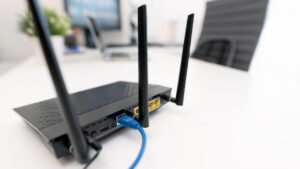
How To Set Up A Wireless Router
Wireless routers play an important role in that they provide internet access to multiple devices within your home. Thankfully, setting up a router needn’t be a difficult process — all it takes is a little know-how. In this post, we’ll walk you through how to set up a wireless router, covering everything from choosing the […]
And Operated
All over the World
Divisions to choose from